Last Updated: May 2026
The GST Helpdesk is an important support system for taxpayers facing issues related to Goods and Services Tax (GST) in India. Whether you need help with GST registration, GST return filing, refund issues, OTP errors, or technical problems on the GST portal, the GST customer care number, email support, and GST grievance portal can help resolve your concerns efficiently.
Taxpayers can now use the GST Self-Service Portal to raise complaints online, track ticket status, and get faster support for GST-related technical and compliance issues.
GST Helpdesk Contact Information
| Support Type | Contact Details |
|---|---|
| GST Helpdesk Number | 1800-103-4786 |
| GST Helpdesk Email | helpdesk@gst.gov.in |
| GST Self-Service Portal | selfservice.gstsystem.in |
| Official GST Portal | www.gst.gov.in |
1. GST Self-Service Portal
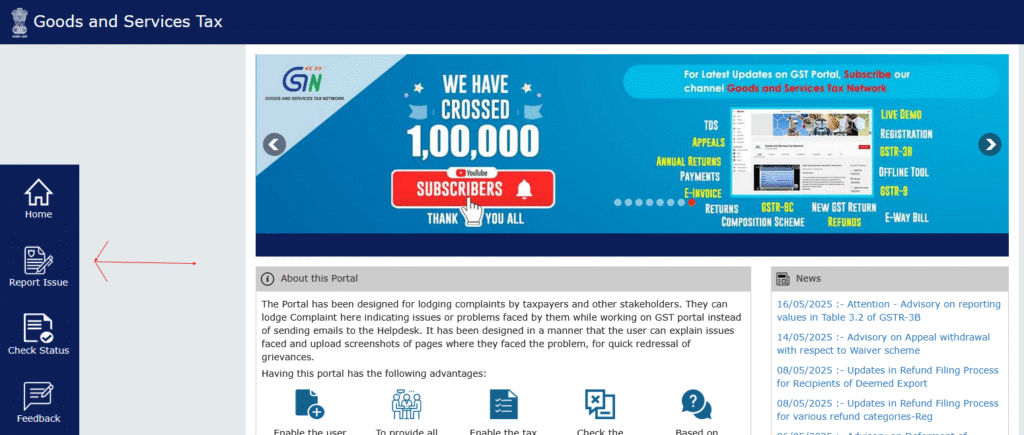
The GST Self-Service Portal allows taxpayers to conveniently report and track GST-related issues online. Users can raise tickets for technical errors, GST return filing issues, login problems, refund delays, DSC errors, and other GST portal-related concerns.
This portal provides faster response times, better tracking transparency, and improved taxpayer support services.
2. GST Helpdesk Number
The official GST customer care toll-free number is 1800-103-4786. Taxpayers can contact the GST helpdesk for assistance related to GST registration, return filing, payment issues, GSTIN problems, and technical errors on the GST portal.
3. GST Helpdesk Email ID
For email support, taxpayers can contact the GST helpdesk at helpdesk@gst.gov.in.
While sending an email, include details such as:
- GSTIN
- Registered mobile number
- Description of issue
- Error screenshot (if applicable)
- ARN or reference number
4. GST Seva Kendra & Local GST Offices
Taxpayers can also visit their nearest GST Seva Kendra or jurisdictional GST office for offline support related to GST registration, notices, return filing, refunds, and compliance issues.
Common GST Portal Issues in 2026
Some of the most common issues faced by taxpayers on the GST portal include:
- OTP not received on mobile or email
- GST portal login issues
- DSC signer utility errors
- Aadhaar authentication failed
- GSTR-1 or GSTR-3B filing errors
- E-invoice generation issues
- E-way bill generation problems
- GST refund delays
- Payment challan failures
- Portal slow or not working
Services Provided by GST Helpdesk
- GST Registration Support – Assistance with new GST registration, amendments, and cancellation.
- GST Return Filing Help – Guidance on filing GSTR-1, GSTR-3B, GSTR-9, and other GST returns.
- GST Refund & Payment Support – Help related to GST refunds, challans, and payment reconciliation.
- Technical Assistance – Resolution of GST portal errors and login issues.
- E-Way Bill & E-Invoice Support – Assistance related to e-way bill and e-invoice portal issues.
How to Raise a Complaint with GST Helpdesk
- Call GST Helpdesk – Dial 1800-103-4786 and follow the IVR instructions.
- Send an Email – Mail your issue to helpdesk@gst.gov.in.
- Use GST Self-Service Portal – Visit selfservice.gstsystem.in and raise a support ticket.
- Visit GST Seva Kendra – Contact your jurisdictional GST office for in-person assistance.
Tips Before Contacting GST Helpdesk
- Keep your GSTIN ready
- Take screenshots of the error message
- Keep ARN/reference number handy
- Use registered email and mobile number
- Clearly explain the issue for faster resolution
Conclusion
The GST Helpdesk provides multiple support channels for resolving GST-related issues efficiently. Whether you need the GST helpdesk number, GST grievance portal, email support, or offline assistance through GST Seva Kendras, taxpayers now have better access to GST support services across India.
For official GST services and support, always use the official GST portal at www.gst.gov.in.
Disclaimer: This article is for informational purposes only. GST India News is not affiliated with the Government GST portal.
GST Helpdesk FAQs
The official GST Helpdesk toll-free number is 1800-103-4786.
The official GST Helpdesk email ID is helpdesk@gst.gov.in.
You can raise a GST complaint online using the GST Self-Service Portal at selfservice.gstsystem.in.
The GST portal may face issues due to server load, technical maintenance, login problems, or browser compatibility issues.
Keep your GSTIN, registered mobile number, ARN/reference number, and screenshots of errors ready before contacting GST Helpdesk.

Hi there
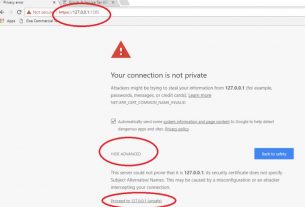
I am trying to log into the Portal but have been unsuccessful. I am trying to claim ~GST back for items I bought in india and brought it to England. I tried https://www.gst.gov.in URL but it comes back with page not found and does not open up in my computer. I tried internet explorer, bing, google etc . can you please help send me a link to log into the portal so I can claim the GST back as I bought a lot of goods to England for my daughter’s wddding.
thank you
Hello Charu
The address is correct. please see whether your pc meets the below requirements to open this site.
1. System Requirements for Accessing the GST Common Portal
Desktop Browser: Internet Explorer 10+/ Chrome 49+ or Firefox 45+
Besides the above on browser compatibility following should not be disabled:
Cascading Style Sheet (CSS) – used to render User Interface look and feel of the portal. Disabling this will not provide appropriate user experience
JavaScript – used to provide enhanced user experience in using User Interface controls. Disabling this will not allow user to perform any transaction in the portal.
Cookie – used to store personalized information of user. Disabling this will not allow user to login and perform any transaction in the portal.
For the Month of July 2020, i have a igst credit note. Can i adjust this igst amount against my output cgst/sgst for the same month? I don’t have ant igst sales for July, 2020. Only CGST/SGST sales
Regards
Hello Dimpy
Yes you can adjust IGST credit. According to the revised CGST rules you should utilize IGST Credit first. you may read more here about these rules from here https://gstindianews.info/gst-set-off-rules-chart-excel-calculation/
Dear sir,
I have shipped through Panitanki customs in manual shipping bill in May-2018. while applying for the refund ICEGATE IGST validation query shows that Shipping bill details are not valid where as I have rechecked with the Customs department and found the shipping bill details are correct. ICEGATE suggests to amend to correct shipping bill but the shipping bill is correct. How can I authenticate the manual shipping bill filed in May 2018?
Hi Mr. Surya
If I remember properly then, i think government has given some timeline to furnish the details manually, for such shipping bills. kindly see if you can get the clarification from here https://gstindianews.info/gst-refund-process/
Regards
There is no GSTR-3B tab only to file the returns. Instead there is GSTR-1/IFF tab present that to it is enabled only to view. How are we to proceed on the same. Request to guide on the same.
Hi Priyanka
The system has put you under QRMP scheme. Therefore, you will not see the GSTR 3B for 1st Two months of the quarter. Learn how to make monthly payment under QRMP scheme.
I hope this helps.
Regards
Dear sir I have applied for surrender gst number but I want to revoke my gst
Pplz help me to stop my application for surrender
Hello Mr. Rahul,
If your registration is already not cancelled, then contact the supt. of your jurisdiction to request not to cancel. if already cancelled then apply for revocation of cancellation online.
Regards
dear sir,
i was suffered by heart problem since last 6 months. and i am to much suffered by covid 19, and not deposited GST return by time. what I can
Hello,
File yours returns now. pay the interest and late fees if applicable.
regards
Hello Sir,
How to add missed or left invoice on current month after filed GSTR 1 but before GSTR 3B ?
if any have solution, please give.
you can add it now. you should consider adding the left invoices in the next month GSTR 1 return.
Central GST Customer Care Numbers 8509489633 · GST Help Desk Email: cbecmitra.helpdesk@icegate.gov.in. Telephone: 1800 103 4786 · GSTN Help Desk Email: ..
this number is invalid
hi you can use self service portal. link updated above